
Why the card belongs on your page
Your customer is already on your page, looking at the invoice, certificate, or permit you published. The verify card places the current Opcilo result on that page, so the visitor is not asked to trust a badge you drew or a screenshot taken on the day you copied it.
Revocation shows on your site because the card is loaded live. When you revoke the seal, the next view of your page shows that result. A screenshot or a homemade badge does not.
Live card versus a picture you saved:
| Topic | Opcilo | Other |
|---|---|---|
| After revocation | Your page shows the revoked result, because the card loads live | The saved image still looks the way it did when you captured it |
| What it is | The live document result for one sealed file | A static picture with no tie to the current record |
| How a recipient confirms | They open the full record on Opcilo, where the address bar is the proof | The image has no Opcilo address to check |
What the visitor sees
On your page, the visitor sees a compact Opcilo card: the Opcilo mark, who sealed the document, the seal date, the seal code, and a link that says Verify on opcilo.com. A shorter bar fits a footer or the space under a download button. The explanation and the legal limit stay on the full record.
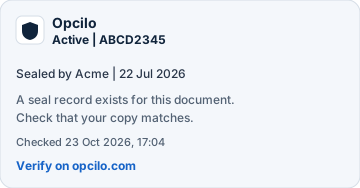

The compact card and the short bar.
What the card shows:
- The Opcilo mark.
- Who sealed the document, and when.
- The seal code.
- A link to verify on opcilo.com.
What stays on the full Opcilo page:
- The longer explanation of what the seal means.
- The legal limit.
- Comparing a file you hold with the sealed record.
The address bar is still the proof
The card on your site helps the visitor see the result where they already are. Recipients confirm by opening the full record on Opcilo. On that page, the address bar is the proof. The full record for a code lives at /verify/{code}. Open Verify when you want the public lookup, and read what Opcilo proves on the verification card for what each line means.
How this works
A workspace turns the card on in four steps:
Start from an eligible workspace
Use a Pro, Team, Business, or Enterprise workspace that already has an approved business verification.
Submit your website address
Submit each exact https website address that will show the card. The setting lives at /app/settings/verify-embed.
Wait for review
Opcilo approves the website address. Only a website address Opcilo has approved can show the card.
Copy it onto your website
After approval, copy the snippet from settings onto that page. Replace YOUR-CODE with the seal code from the document. The card loads live for that seal.
How many sites
Pro and Team include 1 live website and 1 test website. Business and Enterprise include 4 live websites and 1 test website. Each one is an exact https website address. Free workspaces do not include the embeddable card.
What the card does not do
This card is not the Trust Badge. The Trust Badge is the business-identity signal. This card is the live document result for one seal. The glossary keeps a short line for the term; this article is the explanation. See Embeddable verify card in the glossary and the Trust Badge definition.
Frequently asked questions
Does the card decide that the wording in the file is factual?
No. Opcilo does not say the statements inside the document are true. The card shows the live seal result for that file.
Is this the Trust Badge?
No. The Trust Badge is a business-identity signal. This card is the live document result for one seal.
Can we hide the mark or serve the card on our own hostname?
No. The Opcilo mark stays visible. The explanation and the legal limit are on the full record. White-label hostnames are not part of this feature. Removing the Opcilo mark is not part of this feature.
What does our site show after we revoke the seal?
The card is loaded live, so the revoked result shows on your page. A screenshot or a homemade badge does not update.
Which plans can show the card, and on how many sites?
A Pro, Team, Business, or Enterprise workspace with an approved business verification. Pro and Team include 1 live website and 1 test website. Business and Enterprise include 4 live websites and 1 test website. Opcilo approves each website address before the card can appear there.